I'm about to register for the The eclipse summit 2006 October 11-12 in Germany. On the web page there are 4 hotels suggested, but no clue how far they are away from the actual summit (are they in walking distance?). The summit seems to be at Ebershaldenstraße 12, 73728 Esslingen, Germany. I called all of them to ask for the price for the eclipse summit. The hotels all seem to be in the 100 Euro category. I think breakfast is included in all cases.
Best Western Premier Hotel Park Consul Esslingen
Grabbrunnenstr. 19
73728 Stuttgart/Esslingen am Neckar
Tel: +49(0)711-41111-0
Fax: +49(0)711-41111-699
Distance: 150 meters
Email: marcus.schlaich@consul-hotels.com
Single Room: 110 Euro
Hotel Linde Berkheim
Ruiterstraße 2
73734 Esslingen am Neckar
Tel: +49(0)711-345305
Fax: +49(0)711-3454125
Distance: 4 km
Email: info@linde-berkheim.de
Single room: 85 Euro - Double room 114 Euro (until Sep. 8th)
Hotel Am Schillerpark
Neckarstr. 60, 73728 Esslingen am Neckar
Tel: +49(0)711 931 33-0
Fax: +49(0)711 931 33 100
Distance: 1.2 km (walking distance 800 meter)
Email: info@hotel-am-schillerpark.de
Singe Room: 89 euro (20 rooms for the summit)
Ringhotel Rosenau
Plochinger Straße 65
D-73730 Esslingen am Neckar
Tel: +49(0)711 315 45 60
Fax: +49(0)711 316 13 44
Distance: 1 km
Email: info@hotel-rosenau.de
Prices: The lady at the reception did not know about the "Eclipse Summit". I should call tomorrow before 4PM.
Monday, August 07, 2006


How to quickly add a new repository location to CVS...
The eclipse Add a new CVS Repository dialog allows you to quickly fill the form, if you drop a string like
You can also select a location in the CVS Repositories view and "Copy to Clipboard" and send it to someone. The receiver can then drop it into the Add a new CVS Repository.
:pserver:anonymous@dev.eclipse.org:/home/dsdp into the Host: field. If you see a string like cvs -d:pserver:anonymous@foo.cvs.sourceforge.net:/cvsroot/foo loginat sourceforge, grab the highlighted part (including the colon before pserver)...
You can also select a location in the CVS Repositories view and "Copy to Clipboard" and send it to someone. The receiver can then drop it into the Add a new CVS Repository.
Saturday, August 05, 2006
Eclipse was hanging my machine regularly -- solution -XX:MaxPermSize=128m
I have quite some plugins installed in my eclipse installation. Since a few weeks, eclipse was running mad from time to time, my XP laptop was totally starving, I was not even able to get to the task manager to kill eclipse (keyboard and mouse barley reacted). The only solution was to kill my machine :-(.
Well, but how to find out who is the bad guy? Which of the many plugins I have installed "killing me"? I was using Stack Trace, a cool application that lets you attach to eclipse and get a stack trace.
Most of the time the stack traces of the wild application ended in:
Hmm, the class loader puts the class files in a special area of the garbage collector, (perm generation). The starving (100 % CPU and being really bad) seemed to be caused by not enough memory in the perm space. To fix this, I added
But how much is the perm size really? How to find this out? Today, I found a blog entry by Igor Shabalov describing a cool tool called jconsole, that comes with jdk1.5.0, that allows you to inspect memory related information of your java applications life. All you have to do, it to add
Well, but how to find out who is the bad guy? Which of the many plugins I have installed "killing me"? I was using Stack Trace, a cool application that lets you attach to eclipse and get a stack trace.
Most of the time the stack traces of the wild application ended in:
 at java.lang.ClassLoader.defineClass1(Native Method)
 at java.lang.ClassLoader.defineClass(Unknown Source)
 at org.eclipse.osgi.internal.baseadaptor.DefaultClassLoader.defineClass(DefaultClassLoader.java:160)
 at org.eclipse.osgi.baseadaptor.loader.ClasspathManager.defineClass(ClasspathManager.java:498)
 at org.eclipse.osgi.baseadaptor.loader.ClasspathManager.findClassImpl(ClasspathManager.java:468)
 at org.eclipse.osgi.baseadaptor.loader.ClasspathManager.findLocalClassImpl
Hmm, the class loader puts the class files in a special area of the garbage collector, (perm generation). The starving (100 % CPU and being really bad) seemed to be caused by not enough memory in the perm space. To fix this, I added
-vmargs -XX:MaxPermSize=128m to the shortcut that starts eclipse. That solved the problem! The sun default seems to be 64MB (I could not find information for java1.5). But how much is the perm size really? How to find this out? Today, I found a blog entry by Igor Shabalov describing a cool tool called jconsole, that comes with jdk1.5.0, that allows you to inspect memory related information of your java applications life. All you have to do, it to add
-Dcom.sun.management.jmxremote to the eclipse -vmargs. Then you can attach to eclipse and see life the different garbage collection pools and the loaded classes and threads -- pretty cool...
Friday, August 04, 2006
How to create apply a patch that contains changes in multiple projects?
Eclipse has a nice feature to apply patches (context menu of a project: Team->Apply Patch....). If you have multiple projects under CVS control, then you can create a patch that contains changes from multiple projects. The patch looks slightly odd, because id adds some additional lines that tell eclipse which projects a file belongs to. This has is new in eclipse 3.2 (bug 110481).
However if you have a patch created with diff outside eclipse that contains files from multiple projects, eclipse cannot apply the patch.
To apply my multi project patches I wrote a small Eclipse Monkey script that converts a patch on the clipboard to a Eclipse Workspace Patch 1.0, by adding some additional lines.
To install and run the script:
However if you have a patch created with diff outside eclipse that contains files from multiple projects, eclipse cannot apply the patch.
To apply my multi project patches I wrote a small Eclipse Monkey script that converts a patch on the clipboard to a Eclipse Workspace Patch 1.0, by adding some additional lines.
To install and run the script:
- Install Eclipse Monkey (if you have not already installed it)
- Copy the script below (including the odd lines at the beginning and the end) to the clipboard
- In the Monkey menu do Paste New Script
- Now you can convert patches to Eclipse Workspace Patch 1.0, by copying that patch to the clipboard and running Monkey->Tools->Convert patch in clipboard to workspace patch
--- Came wiffling through the eclipsey wood ---
/*
 * Menu: Tools > Convert patch in clipboard to workspace patch
 * Kudos: Michael Scharf(eclipsemonkey @ scharf . gr)
 * License: EPL 1.0
 */

// pseudo imports
var ArrayList=Packages.java.util.ArrayList;
var Pattern=Packages.java.util.regex.Pattern;
var StringBuffer=Packages.java.lang.StringBuffer;
var BufferedReader=Packages.java.io.BufferedReader;
var StringReader=Packages.java.io.StringReader;
var ResourcesPlugin=Packages.org.eclipse.core.resources.ResourcesPlugin;
var MessageDialog=Packages.org.eclipse.jface.dialogs.MessageDialog;

var dnd=Packages.org.eclipse.swt.dnd;


function main() {
  var patch = getFromClipboard();
  if(patch == null) {
    showMessage("The clipboard does not contain a string!");
  } else {
    // is this already a workspace patch?
    // the (?m) makes sure that the ^ matches the beginning of a line
    // and not just the beginning of the string!
    var pattern=Pattern.compile("(?m)^### Eclipse Workspace Patch 1.0");
    if(pattern.matcher(patch).find()) {
      showMessage("This is already a Workspace Patch!\n" +
                  "It contains a line beginning with:\n" +
                  "\"### Eclipse Workspace Patch 1.0\"");
    } else {
      var messages =  new StringBuffer();
      patch = convertToWoskspacePatch(patch, messages);
      // has it been converted?
      if(patch == null) {
     showMessage("The clipboard does not contain a valid patch.");
      } else {
        // OK let's put it on the clipboard
        putOnClipboard(patch);
        showMessage("Patch converted to clipboard\n\n" + messages.toString());
      }
     }
  }
}

// show a simple message dialog
function showMessage(message) {
 MessageDialog.openInformation(
     window.getShell(), "Convert patch to workspace patch", message);

}
function convertToWoskspacePatch(patch, messages) {
  var reader =  new BufferedReader( new StringReader(patch));
  var patchBeginPattern = Pattern.compile("^(---|[+][+][+]|RCS file:)\\s+([^\t\n,]+)");
  var result =  new StringBuffer();
  result.append("### Eclipse Workspace Patch 1.0\n");
  var projects = ResourcesPlugin.getWorkspace().getRoot().getProjects();
  var guessedProjects =  new ArrayList();
  var patchFound = false;
  var line;
  var prevLine = null;
  var hunkFound = false;
  while((line = reader.readLine()) != null) {
    var m = patchBeginPattern.matcher(line);
    if(m.find()) {
      patchFound = true;
      var fileName = m.group(2).trim();
      var pathSegments = fileName.split("[/\\\\]");
      var segment = 0; // the segment in the path that is the project
      var projectName = null;
      for(var i = 0; i < pathSegments.length; i++) {
        var name = pathSegments[i];
        if(isProjectName(projects, name)) {
          projectName = name;
          segment = i;
          hunkFound=true;
          // report every guessed project only once
          if(!guessedProjects.contains(projectName)) {
            messages.append("Guessed Project: ");
            messages.append(projectName);
            messages.append("\n");
            guessedProjects.add(projectName);
          }
          break;
        }
      }
      if(projectName != null) {
        result.append("#P ");
        result.append(projectName);
        result.append("\n");
        result.append("Index: ");
        // concat the remaining path segments
        for(var j = segment + 1; j < pathSegments.length; j++) {
          if(j != segment + 1) result.append("/");
          result.append(pathSegments[j]);
        }
        result.append("\n");
        result.append("===================================================================\n");
      }
    }
    if(line.startsWith("+++")) {
      if(!hunkFound) {
        messages.append("No project found for: ");
        messages.append(fileName);
        messages.append("\n");
      }
      hunkFound = false;
    }
    if(prevLine != null) {
      result.append(prevLine);
      result.append("\n");
    }
    prevLine = line;
  }
  if(prevLine != null) {
    result.append(prevLine);
    result.append("\n");
  }
  reader.close();
  if(!patchFound)
    return null;
  return result.toString();
}

function isProjectName(projects, name) {
  // is the name a name of a project?
  for(var i = 0; i < projects.length; i++) {
    if(projects[i].getName().equals(name))
     return true;
  }
  // ok let's guess...
  if(name.startsWith("com.") || name.startsWith("org.")) {
    return true;
  }
  return false;
}
function putOnClipboard(str) {
  var clipboard =  new dnd.Clipboard(window.getShell().getDisplay());
  try {
    clipboard.setContents([str], [dnd.TextTransfer.getInstance()]);
  } finally {
    clipboard.dispose();
  }
}
function getFromClipboard() {
  var textTransfer = dnd.TextTransfer.getInstance();
  var clipboard =  new dnd.Clipboard(window.getShell().getDisplay());
  try {
    return clipboard.getContents(textTransfer);
  } finally {
    clipboard.dispose();
  }
}

--- And burbled as it ran! ---
Friday, July 28, 2006
Why is super.super illegal?
Well, from time to time I have the need to call super.super. I wonder why this is illegal. Doing some research on the Internet, the best answer I can come up with is, that it breaks encapsulation of the super.super class. Hmm, probably true in a clean world, but sometimes you really want to call back back the original functionality:
Yes, B should not do stupid things. But why can't C undo what B does? In real software systems, that's exactly something that is somtimes needed. The answer that B should provide access to A.foo() if B thinks C would need it does not really satisfy me...
Come on, if java would really be concerned about encapsulation, all methods would default to
But maybe someone can give me an explanation that can convince me....
class A {
    protected void foo(){..}
}
class B extends A {
    protected void foo(){
        super.foo();
        doSomethingStupid();
    }
}
class C extends B {
    protected void foo(){
        super.super.foo(); // it is illegal to omit the stupid stuff of class B
        doSomethingUseful();
    }
}
Yes, B should not do stupid things. But why can't C undo what B does? In real software systems, that's exactly something that is somtimes needed. The answer that B should provide access to A.foo() if B thinks C would need it does not really satisfy me...
Come on, if java would really be concerned about encapsulation, all methods would default to
final unless otherwise specified. Does everybody think about the fact that any non-final public or protected method can be overridden? No! We live with this accidental breakage of encapsulation and why is the small breakage of encapsulation that super.super does forbidden? Hey, a subclass can just override any non-final method without calling super at all, right? And C can call any method on B or A, but not super.super.foo()....But maybe someone can give me an explanation that can convince me....
I hate ClassCastExceptions...
...because they don't tell me what the class of the "wrong" object was. No message, just empty. Where is the difficulty in telling me, what the actual type of the object was that caused the class cast exception? I rarely see them, but when I see them it's not informative enough -- I have to run the debugger but those rare class cast exceptions are often hard to reproduce...
Sun, please add runtime type of the casted object to the ClassCastExceptions message
How to setup some plugins to use java 1.5 in a java 1.4 workspace?
Most of the eclipse projects use and require java 1.4. Sometimes you want to create a new project to use java 1.5. If you simply install and select a java 1.5 in the Preferences->Java->Installed JREs, that would work, but cause potential problems. One problem is that you might accidentally use 1.5 features in 1.4 projects. A simple statement like:
string.replace("foo", "bar") complies in this setup but will not run with a 1.4 jre, because replace(CharSequence target, CharSequence replacement)is new in 1.5.
The solution is to setup only the plugins that really need 1.5 to use 1.5 Eclipse has the concept of Execution Environments to specify which java JREs a plugin is compatible with.
1. set in the preferences an 1.4 jre as default and have an 1.5 installed:
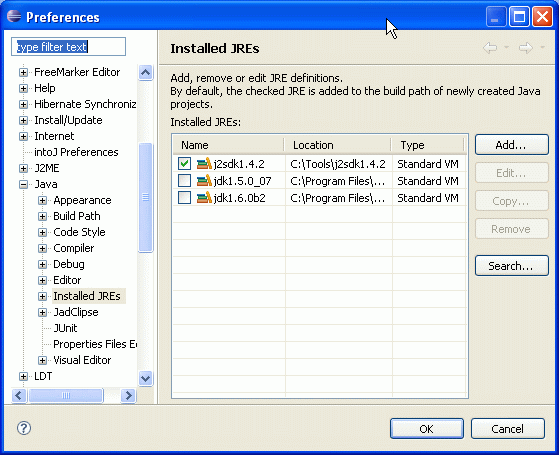
2. In the project properties set the java compiler 1.5 (which is Compiler complience level 5.0 -- how I love the ever changing java version naming...):
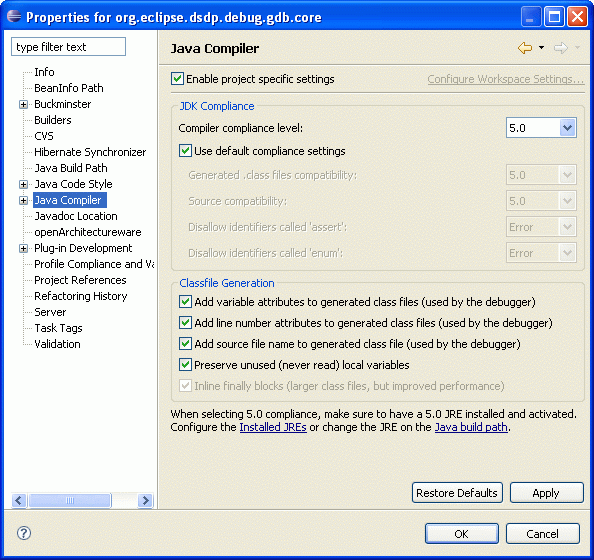
3. Set the execution environment in the build path to J2SE-1.5:
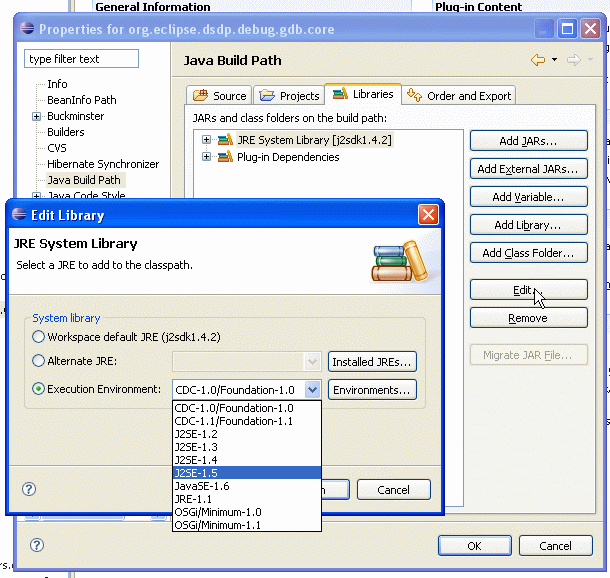
4. In the plugin MANIFEST.MF, set the execution environment to J2SE-1.5 as well:
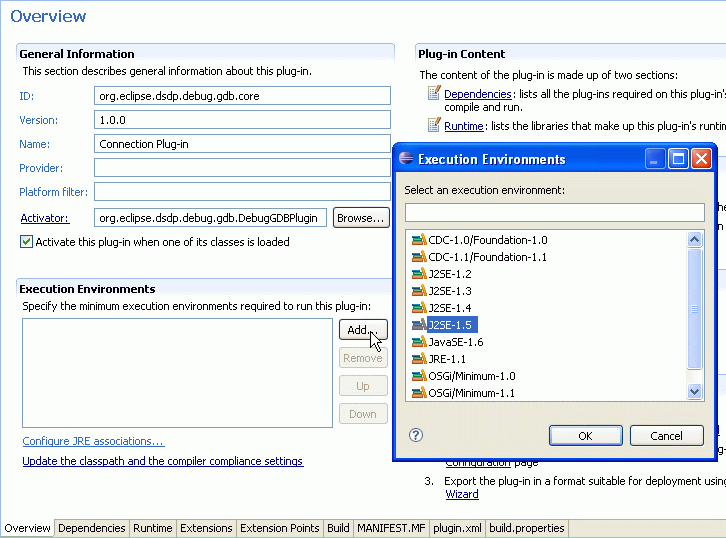
You could also directly add the following line to the MANIFEST.MF file

That's it :-)
Friday, May 05, 2006
How to start the OSGI console?
Yesterday, I posted two bugs for 3.2. For both bugs I got the reply I should use the osgi console to get some information. In one case to get the loaded plugins and in the other case to get a stracktrace of all threads. So, how to start the osgi console?
I found the Gathering Information About Your Plug-in page.
On windows you have to start eclipse with java.exe (instead of javaw.exe) in odrer to ge a console window. Therefore, add
Now to see all plugins (and the state of the plugins) simply type
I found the Gathering Information About Your Plug-in page.
On windows you have to start eclipse with java.exe (instead of javaw.exe) in odrer to ge a console window. Therefore, add
-vm C:\YOURVMPATH\bin\java.exe tho the eclipse start command (or shortcut). To get the OSGI console -consol as startup parameter.Now to see all plugins (and the state of the plugins) simply type
ss into the console. To get a stracktrace of all threads hit ctrl-break in the console window (I had a hard time finding the break key on my keyboard. it's the top right key on my keyboard)
Thursday, February 23, 2006
What does eclipse API freeze mean?
The eclipse 3.2 APIs have been frozen. John Arthorne has send a mail to eclipse-dev@eclipse.org:
Between now and the 3.2 release, all changes to API require the following action before releasing any code:
Also, if it is a breaking API change, you should search for references across the SDK, and coordinate the release with any clients that have already adopted the API being broken.
The PMC has asked Boris Bokowski and I to track API changes during this period. Please also CC either Boris or myself on the bug so we can keep track of the changes.
Between now and the 3.2 release, all changes to API require the following action before releasing any code:
- A bug report describing the change, and the reason it is required.
- Approval from a PMC member (in the form of a +1 on the bug report).
Also, if it is a breaking API change, you should search for references across the SDK, and coordinate the release with any clients that have already adopted the API being broken.
The PMC has asked Boris Bokowski and I to track API changes during this period. Please also CC either Boris or myself on the bug so we can keep track of the changes.
Monday, January 30, 2006
SWT/JFace integer flags and constructors
SWT/JFace is pretty cool. But one thing I will never understand is why the heck are the flags in the constructor of widgets integers. Let's take TableViewer as example:
Ok this gives you a hint, what to use. But if you follow the link to
I don't want to blame the documentation. The problem comes from the design choice to use integer bits constants in the first place. If you look into the class SWT, you are simply overwhelmed by all the integer constants. I see two solutions (in Java 1.4): >
TableViewer(Composite parent, int style). When you want to set style parameter, code completion does not help. So you have to read the (3.1) javadoc of TableViewer it says: @param style SWT style bits. Great, but not very helpful. Ok if you are clever, you know that TableViewer passes the status flags directly to the Table constructor. The documentatios there there indicates that the following flags can be used SWT.SINGLE, SWT.MULTI, SWT.CHECK, SWT.FULL_SELECTION, SWT.HIDE_SELECTION, SWT.VIRTUALOk this gives you a hint, what to use. But if you follow the link to
SWT.MULTI, you read: "Used by Text,List and FileDialog"... Hmm, no mentioning of Table....I don't want to blame the documentation. The problem comes from the design choice to use integer bits constants in the first place. If you look into the class SWT, you are simply overwhelmed by all the integer constants. I see two solutions (in Java 1.4): >
- eclipse supports structured comments for code completion, and the javadoc would reflect the flags correctly.
- Use some classes representing the flags:
Then the constructor of TableViewer and Table would take this class. You would have all the benefits of code completion and documentation. Internally, SWT could still use integer bit flags, but as a user I would have a fully typed constructor: Instead of
 public static class Style {
  int flags;
  public Style(){}
  protected Style(int flags) {
   this.flags=flags;
  }
  public Style multi() {
   return new Style(flags|SWT.MULTI);
  }
  public Style full_selection() {
   return new Style(flags|SWT.FULL_SELECTION);
  }
  ...
 }
new TableViewer(parent,SWT.MULTI|SWT.FULL_SELECTION) I would use the fully typed construct new TableViewer(parent,new Table.Style().multi().full_selection()). Code completion would help me. No more wrong flags! I would love to see additional constructors(and methods) with typed versions....
Subscribe to:
Posts (Atom)